 FileDesk
Built in Pakistan, for Pakistani practice
Your whole tax practice, on one desk.
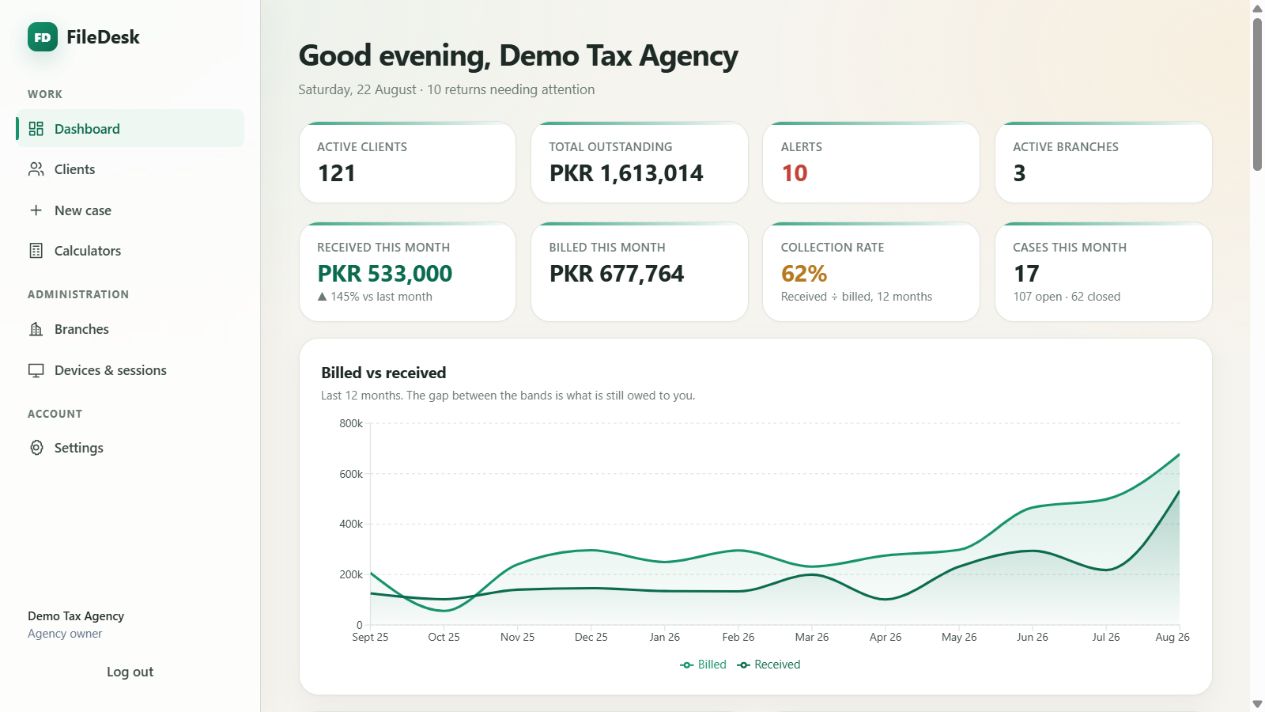
Clients, cases, returns, client papers and every rupee you are owed — in one system that your branches share and your deadlines can't hide from.
Unlimited branches · Encrypted document scanning · Wealth-statement register · TY2025–TY2027 calculators
The problem
Most practices run on memory, WhatsApp and a spreadsheet that only one person understands.
Then September arrives. Nobody is certain which returns are unsubmitted, which clients still owe money, or where a client's portal password was written down.
Deadlines that find you
Every unsubmitted return for a tax year surfaces on the dashboard as its filing date approaches — with days remaining, per client, per branch.
Money you can prove
An append-only ledger: agreed fees, payments and reversals. Nothing is edited away. Invoice and receipt numbers are generated for you.
One login per client, kept safe
Portal credentials live in an encrypted wallet, not a notebook. The branch extension fills them into the portal so nobody types or shares them.
Documents & wealth statements
From the papers on your desk to a wealth statement that reconciles.
Scan a client's papers with a phone, keep them in the client's file, and build the wealth statement from what actually happened — with a record of who touched what.
Scan
Your phone is the scanner
Photograph a CNIC, deed or bank statement. FileDesk finds the page edges, flattens and cleans the page, and saves every page as one PDF. Drag a corner if it needs help.
Privacy
Encrypted before it is saved
Every file is encrypted on your phone or computer before it is saved. Only your agency's staff with permission can open it, and every opening is recorded.
Wealth statement
A register that reconciles
Assets and liabilities as dated events — purchases, sales, gifts, inheritance, loans. Each lands in the right tax year, and every year reconciles opening to closing net worth.
Optional AI
A first draft for you to check
A plain-English summary of a client's timeline, powered by Google. Only the timeline is sent — never documents or the client's name — and ID and phone numbers are stripped from descriptions and notes (keep names out of them too). Not tax advice.
Accountability
Who did what, and when
An activity log of every document uploaded, opened, edited or deleted and every register change — and whether it was the owner or which branch.
Mobile
Made for the phone
A bottom tab bar with Scan in the middle. Install FileDesk on your phone like an app, and stay signed in on your phone and your desktop at the same time.
Built for multiple branches
One agency. Many offices. No duplicate spreadsheets.
Add as many branches as you run. Each gets its own login and its own view of the work; you get the whole picture.
Per-branch permissions
Eight switches per branch: add and edit clients, create cases, receive payments, view fee amounts, create reversals, and upload, view or delete client documents. Turn off what a branch should not do — including hiding money entirely.
Branch-scoped workload
A branch sees the cases it is responsible for, with its own throughput and return workload charts. The owner sees every branch combined, plus income the branches never see.
Device control
Every branch extension is a registered installation. One active extension installation per account, revocable from the owner's screen, with a fresh activation required to move machines. The web app allows up to two devices per account.
Sign them out from anywhere
End a branch's web session across every browser instantly — without touching its extension, and without disturbing anybody else's work.
The calculators
The rates are already in it.
Five statutory calculators covering TY2025 to TY2027, kept current centrally — your team never re-types a slab.
Salary & Pension
Annual tax with the s.4AB surcharge and monthly withholding. s.12 · s.149 · s.149(1A)
Business & AOP
Business and AOP tax with s.21 disallowances and the s.113 minimum turnover tax.
Property
Advance tax for buyer and seller plus capital gains. s.236C · s.236K · s.37(1A)
Withholding
Searchable catalogue with filer-status treatment and contract gross-up.
Agency fee estimator
Separates your service charge from pass-through government duties when quoting.
Charts that explain
Every calculator draws the schedule, marks where your client sits, and cites the section.
Calculations run entirely inside your browser. Nothing you type into a calculator is transmitted or stored — it is a working tool, not a record.
The branch extension
Sign in to the portal without ever seeing the password.
Search a client by name, CNIC or NTN in the extension, press Fill, and the login form is completed for you.
- ✓Two fields only. Identifier and password. The CAPTCHA is never touched — staff always complete it themselves, by design.
- ✓Quick search. Your client list is kept up to date on the approved computer, so search is instant, and saved passwords stay encrypted there. You still need an internet connection to use the FBR portal.
- ✓Scoped tightly. The extension works only on the FBR portal pages it is built for — never on other websites.
- ✓Filters for the season. Show only clients with a pending return, then work down the list.
The password is filled, not shown. Staff can sign a client in without ever being able to read, copy or take that credential home.
Credentials are decrypted only at the instant a form is filled, inside the page, and dropped from memory immediately afterwards.
Extension in action
From client search to portal fill
Watch the real FileDesk extension open on a supported portal, find the right client and fill the permitted login fields.
Questions
Straight answers
Does FileDesk file returns with FBR for me?
No, and it will not pretend to. FileDesk organises your practice and fills the login form on supported portals. Every filing decision, and every submission, stays with your staff.
How many branches can I have?
Unlimited. Each branch gets its own login, its own permissions and its own workload view. There is no per-branch charge built into the software.
Where are my clients' portal passwords kept?
Encrypted before they are saved, with a separate key for each field. They are never written to logs and never sent to any third party. The branch extension receives them only over an encrypted connection after it has signed in, and keeps them encrypted on the computer. See Security for the detail.
Who can open a client's scanned documents?
Only your agency's signed-in staff whose branch is allowed to view documents — the agency owner always can. Each document is encrypted on the phone or computer before it is saved, every opening is recorded in the activity log, and documents are never sent to AI. The privacy policy explains exactly how.
What does the optional AI summary see?
Only the client's wealth-register timeline: dates, kinds of asset, events, amounts, and the item descriptions and notes your staff type. The client's name, the register's reference numbers and the other parties you record are never sent. CNIC, NTN, phone numbers and other long numbers are removed from descriptions and notes automatically, but names typed into them are not, so keep names out of notes. Documents and scans are never sent. The summary is powered by Google, it is optional, and it is a draft to check, not tax advice.
Can I get the extension from the Chrome Web Store?
FileDesk is being prepared for its first Chrome Web Store listing. Until Google has approved and published it, access is arranged directly with FileDesk. A FileDesk account, licence and registered installation remain required.
What happens to my data if I stop using FileDesk?
It is yours. Encrypted backups are produced on a schedule, and client documents stay encrypted where they are stored. Ask and you will get an export of your agency's data, including its documents, and be shown how a backup is restored.
How is it priced?
Per agency, agreed directly, based on how many branches and client records you run. Send an enquiry and you will get a straight number, not a quote form.

The person behind it
Software built by someone who actually sweats the details.
FileDesk is designed, written and supported by Muhammad Ahsan — a developer who treats software less as code shipped and more as a problem genuinely solved.
His work sits where creativity meets engineering discipline: systems in AI / ML, customer relationship management, point-of-sale, learning management, and hospital management. Different industries, one instinct — find the friction people have quietly learned to live with, and remove it.
FileDesk came from watching Pakistani tax practices lose evenings to the same avoidable chaos every September. It is opinionated on purpose, secure by default, and finished to a standard he would be comfortable relying on himself.
FileDesk is a product of Avezea — Muhammad Ahsan's software studio.
Talk to the person who built it.
Not a sales team — Muhammad Ahsan, directly. Tell him about your practice and he will tell you honestly whether FileDesk fits it.